


I’ve wanted to make book summary videos for a long time.
I’ve read the books. I’ve taken detailed notes in Obsidian. I’ve spent 90 minutes on the Bookworm podcast discussing each one at length. The material was all there.
But every time I thought about actually making these videos, I ran into the same wall: they take a lot of work. And compared to the Obsidian videos I usually publish on my Practical PKM channel, they got about 1/10 of the views.
So I didn’t make them. It wasn’t worth it. And it made me a little sad.
A few weeks ago, I was telling my mastermind group about this struggle. The advice I got from multiple people: start a brand new channel.
Great advice, as it keeps things nice and clean for the algorithm. But also, a lot of extra work if I want to maintain my regular publishing cadence on my main channel.
I knew I couldn’t consistently make these videos the way I usually do. But I also knew I’d already done most of the hard work — reading the books, taking copious notes, and recording long-form podcast conversations about each one.
So I asked myself: could I expedite the process by hiring Claude as a research assistant and script writer?
The answer? A resounding “Yes!”
I now have a Claude skill that:
- pulls in my personal book notes from my Obsidian vault
- grabs my rating for the book
- finds the Bookworm episode where we discussed it
- checks the podcast transcript for what I’ve already said about the book
- interprets my emoji-coding system so it knows what’s important to me
- drafts the script in my
Video Scriptsfolder using my Video Script Template file
What used to take me a full day now takes a little more than an hour.
Here’s how I did it (and here’s the video if you want to see the end result):
Step 1: Help Claude Understand the Structure and Tone
I gave Claude 3 different YouTube URLs for previous book summary videos I had published, ones that I knew were good videos, but hadn’t performed well on my main channel. I had written each of these scripts by hand, and those 3 videos gave Claude the structure I wanted:
- Short hook
- Introduce the book
- Section-by-section walkthrough
- Overall verdict + rating
- CTA to download my notes
It also gave Claude a good feel for my tone. It described my style as “open, honest, no-fluff, warm, and conversational,” which I thought was pretty spot on. These scripts need to be quite a bit tighter than the rambling conversations we have on the Bookworm podcast. I want each video to give people a good taste of the book in around 15 minutes.
Step 2: Teach Claude to Read My Book Notes
Once Claude understood what the script should look like, I needed to help it interpret everything I’d already created for each book.
I pointed it at my Obsidian vault using Cowork (Anthropic’s desktop tool for working with local files) and showed it how to navigate my book notes. Specifically, I taught it to:
- Find the notes in the
Book Notesfolder - Grab my rating from the
ratingproperty at the top of the note - Interpret my emoji-coding system (i.e. 💡 = inspiration, 🔑 = key argument, etc.)
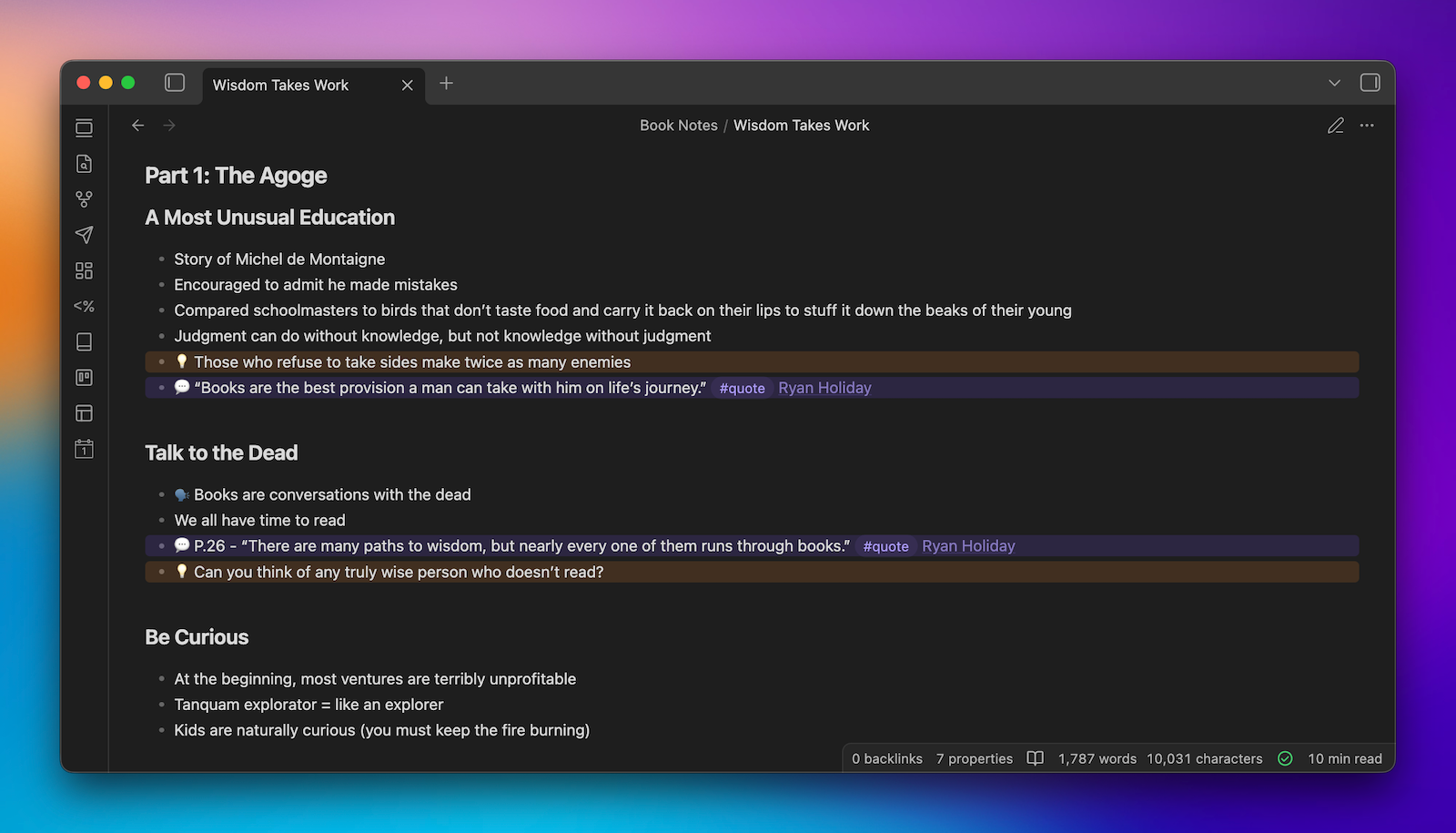
I also wanted to build in mentions of the Bookworm episodes, so the skill searches bookworm.fm, finds the episode number, and works it into the script automatically.
Step 3: Bring in What I’ve Already Said About the Book
My book notes are great, but they’re just highlights and annotations. A lot of my best thinking about a book happens during the 90-minute conversations we have on Bookworm.
So I wanted Claude to have access to that too.
I use MacWhisper to transcribe both sides of the podcast audio from the Dropbox folder where we keep everything. This only takes a couple of minutes, and it gives me a clean transcript I can attach when I run the skill.
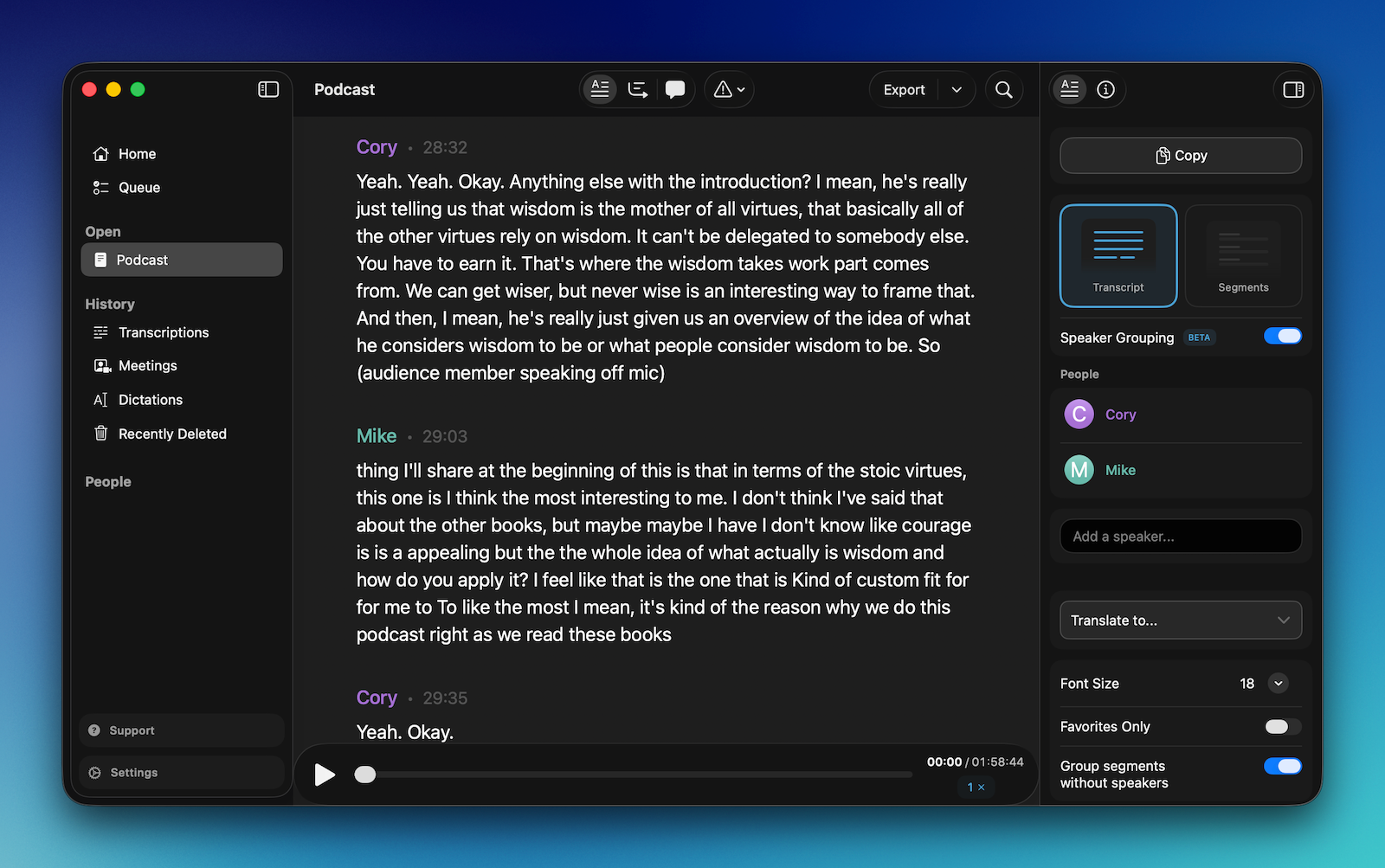
With all of this in place, I can say something like “Let’s do Wisdom Takes Work by Ryan Holiday,” attach the transcript, and Claude writes the video script for me.
I still go through and edit the whole thing, but Claude actually does a pretty great job as a script writer. The entire process from uploading the transcript to finishing the edit only takes about 45 minutes.
But I still need to record (and edit) the video, so that’s what I tackled next.
Step 4: Dial in the Video Style
The script is only half the equation. I still need to get in front of the camera.
My regular Obsidian videos have a very specific style that’s been developed by publishing over 100 videos. But these book summary videos don’t exactly fit that format. So I decided to give my editor a clean slate and the raw material for figuring out the visual style.
I recorded:
- The talking head A-roll from the Claude-generated script
- A series of B-roll for the book using an Osmo Pocket 3
Recording all this video only takes about 30 minutes. After that, I upload the assets to Dropbox, my editor gets to work, and shares the v1 with me via Frame.io.
For the first video, it took a few rounds of revisions to dial in the style. But we’ve got it pretty solid now, so I’m confident future videos will go faster. So yes, I’m paying to outsource the editing of these videos, but it’s actually more affordable than you might think.
The lesson I’ve learned here: If I am willing to relinquish a little bit of control, the end result is often better.
The Bottom Line: Claude Helps Me Make Videos I Wouldn’t Be Able to Otherwise
I’ve always wanted to make these videos regularly, but I never had the budget to hire research assistants or script writers like some of the big YouTube channels do. So even though the material was all there — the notes, the highlights, the podcast conversations — the videos just weren’t going to happen.
Now they are.
Using Claude as a research assistant and script writer, I’m able to make the thing I always wanted to make without my regular work suffering. I still do the reading. I still take the notes. I still have the conversations on Bookworm. I still sit down, edit the script, and get in front of the camera. Claude doesn’t replace any of that, but it helps me get more out of the work I’ve already done.
And that’s what excites me most about this. It’s not that AI is creating for me. It’s that AI is helping me create better.


